Thursday, 1 December 2011

Digipak Designs


Today I have produced the above designs for a suitable digipak for The Script. I used scrabble letters for the album and artist title so the digipak was unique, as most of the digipaks I have seen just use plain text for the title. Creating these digipaks has also improved my skills with the tools in photo shop. I used a selection of the cutting tools, image enchancing and filter tools to adjust the text and images.


I replaced the main image on the front cover for each of the designs. I did this because I wanted to see which images were best suited to the scrabble letter text. I think the best designs based on the colour schemes and the genre of the artist is the two designs at night with the stars. The original image was purple and I then converted the image to greyscale which suited the scrabble letter text much more than the purple did.

By using the scrabble letters in these digipaks it has allowed me to see that I do not have to use plain text on the digipak front cover. I am now considering using the scrabble letters or fridge magnets, or something along those lines.

Thursday, 24 November 2011

Using Photoshop Elements


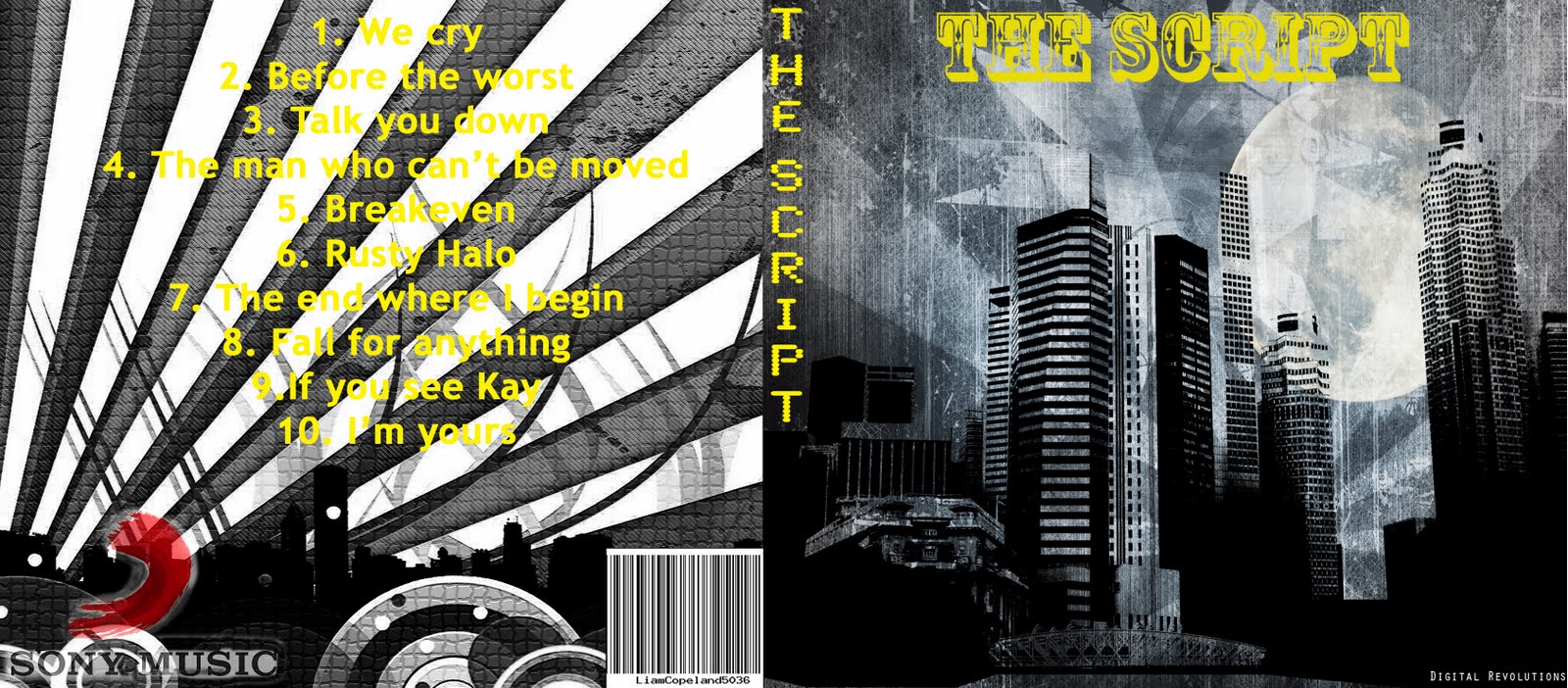
These are the outside covers of A digipak which I have created. This product was very simple as I chose good quality images to begin with so I didn't need many effects on these images. Producing the outside of this digipak has really given me a good idea of what images are suitable for the digipak based on my particular artist and the genre of them.

I used the rubber tool and also the texture tool when creating this digipak. I used the rubber tool on the sony music label logo and text after I had used the lasso tool to cut these out. I used the rubber to smooth out the edges of the image and then also give the image a faded effect by changing the opacity of the rubber to 40%. The texture tool I used for the back cover image just to make the image more interesting and attractive.

Once I had input the track listing on the back cover I felt that his was not easy to read. To overcome this I altered the colour levels of the background such as the saturation of the image and also made this image lighter. I also changed the text colour to black which made this a lot clearer. However I felt the back cover of the digipak was very dull so I decided to change the text back to yellow and alter the colour levels of the image. I made the image lighter so the text stood out a bit more to the audience.

Creating this digipak has helped me a lot as I now know the kinds of images which are suitable for my production, such as tall buildings, housing estates and busy streets which I will be able to take pictures of for my final digipak.

Tuesday, 22 November 2011

Filming Lip Syncing

This afternoon I was schedueled to film along with my artist for my music video. We began to film however It then became clear to me that my artist still hadn't fully grasped the lyrics and the speed it which these come. He struggled with the line
"Gonna stay with friends in London and thats all I get to know" which is from verse one.

My artist has now gone away with the track and lyrics to practise and I will rescheduele to film with my artist when he feels he has a better understanding of these.

Creating A Unique Barcode

In todays lesson I Created a unique barcode from the following site www.barcodesinc.com/generator/index.php . I created this by inputting my name and then my candidate number to give me a totally unique barcode design. I did this because I need to include a barcode in my ancillary tasks as it is one of the main features on the back of the CD Digipak. This will allow me to use a barcode without having to consider the aspects of copyright if I was to use a barcode just from the internet.


Monday, 21 November 2011

Filming

Today I filmed a lot of point of view shots of me walking around a modern housing estate. I wanted to get the effect of a shaky camera to give the audience the impression of somebodys head and seeing the music video through that persons perspective. I also filmed so establishing shots and also some close up, mid shots and high angled shots of my female character.

I then filmed the opening scene to my music video which was again my female character. I ensured she was wearing suitable clothing which was appropriate for the genre of the artist and music and also the audience who listen to this music. My female performer put eye liner and black eye shadow on and around her eyes and then applied water to this area which gave the impression she had been crying as the make up ran down her face. I chose to do this as the lyrics "I can feel the colour running
As it's fading from my face"
could be seen to connote this.

Whilst walking through the estate I had an idea which I seen from another video on a music channel recently. The idea was to film my shadow as I was walking underneath a street light. This idea was from the Gym Class Heroes track "Stereo Hearts".


Thursday, 17 November 2011

Learning To Use Adobe Photoshop Elements

In todays lesson Mrs Craddock came into to assist us in using photoshop elements. We concentrated on portrait pictures of our chosen artist and then edited them. We did this by using a selection of cutting tools such as magic wizard tool, lasso tool and the magnetic lasso tool. I then added a background image to the page to create a setting/atmosphere. I made the image look realistic along with the background by blurring the portrait and also by enhancing colour and light light levels. The portrait looked very clear with no rough edges as I used the eraser tool to smooth these out.


Original Image Altered Image


Lip Syncing With My Artist

I have arranged with my artist that I will lip sync next tuesday. I have gave my artist the track to listen to and also I have printed of the parts of the lyrics I would like him to lip sync too. I have done this so he is well prepared for when I want to come and film the lip syncing and also so he has a better idea of the genre of the song and artist.